

Advanced
Geolocation, network-based access restrictions and open client registration for AI agents, all instance-wide.
Geolocation resolves the country and region behind an incoming request, and it is the prerequisite for the network-based restrictions that can hold traffic to a region. Both are configured on the Advanced tab, and both change how every request to the platform is evaluated, so apply them deliberately.
Caution: The restrictions on this page apply across the whole instance. A misconfigured rule — for example an EU-only restriction applied where legitimate users sit outside the EU — can lock users out. Verify the impact before enabling.
Geolocation
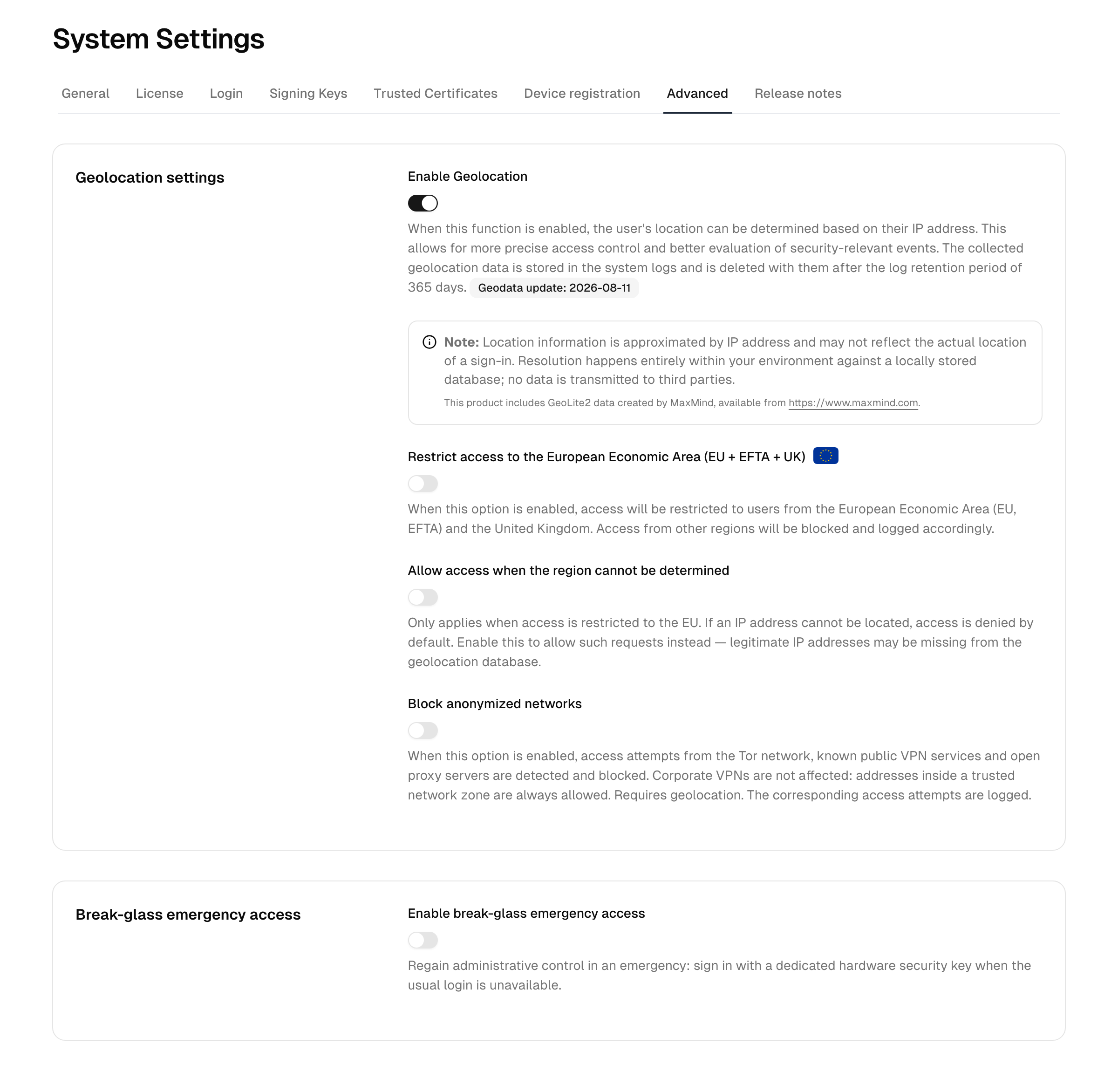
Enable geolocation turns on resolving the country and region of incoming requests from their IP address. Geolocation is a prerequisite for the network-based restrictions below and for impossible-travel detection, and it enriches audit records and security signals. While geolocation is off, impossible-travel detection cannot run.
The page shows the date of the geolocation dataset currently in use. Lookups resolve entirely within your instance against a locally stored copy of the dataset; no data is transmitted to third parties. Resolved locations are stored in the system logs and are deleted with them when the log retention period expires.
To change it, toggle Enable geolocation. The dependent restrictions become available only while geolocation is on.
Network-based restrictions
These options become available once geolocation is enabled.
Restrict access to the European Economic Area (EU + EFTA + UK)
When enabled, requests originating outside the European Economic Area (EU, EFTA) and the United Kingdom are blocked. Use this to enforce a regional access boundary for the whole instance.
Some IP addresses cannot be located — they may belong to new ranges, carrier-grade NAT, or uncommon providers that are not yet in the geolocation dataset. By default such requests are denied while this restriction is active, because the platform cannot confirm they originate from that region.
Allow access when the region cannot be determined
Applies only while that regional restriction is on. When enabled, requests whose IP address cannot be located are allowed instead of denied. Turn this on if legitimate users are being blocked because their IP address is missing from the geolocation dataset; leave it off to keep the regional boundary strict.
Block anonymized networks
When enabled, requests arriving from the Tor network, known public VPN services or open proxy servers are blocked. This reduces anonymized access to the platform without affecting your corporate VPN: addresses that sit inside a trusted network zone are always allowed, so add your company egress ranges there before turning this on. Blocked attempts are logged.
The detection uses lists of Tor exit nodes, commercial VPN provider ranges and live public proxy servers. These lists are refreshed periodically; a very recently launched endpoint may not yet be covered.
For finer control, block a single network type only for specific apps by combining a network zone with an authentication policy, instead of this instance-wide switch.
Open registration for AI agents
Note: Available with the Pro subscription.
The Open registration card lets AI agents and other public clients register themselves without an initial access token. Switch on Open registration for public clients, select the directories whose users may sign in to such clients under Users who may sign in, and select Save changes. The rules that apply to openly registered clients (public clients only, rate limits, automatic removal of unused registrations) are described under Dynamic client registration.
Reference
| Setting | Depends on | Effect |
|---|---|---|
| Enable geolocation | — | Resolves request location; required for the restrictions below |
| Restrict access to the European Economic Area (EU + EFTA + UK) | Geolocation | Blocks requests from outside the EEA and the United Kingdom |
| Allow access when the region cannot be determined | EU restriction | Allows requests whose IP address cannot be located instead of denying them |
| Block anonymized networks | Geolocation | Blocks requests from Tor, known public VPN services and open proxy servers; trusted network zones are exempt |
| Open registration for public clients | Pro subscription, at least one directory | Lets public clients such as AI agents register without an initial access token |
Note: For per-network allow/deny rules and zone-based access policies, see the network controls under Monitoring and conditional access under Security. The Advanced tab covers only the instance-wide settings above.