

Signing keys
View, rotate, and revoke the keys that sign OIDC and SAML tokens, and understand why rotation matters for connected applications.
The platform signs the tokens it issues — OIDC ID tokens and access tokens, and OAuth/OIDC assertions — with a private signing key. Connected applications verify those signatures against the matching public key, which the platform publishes at its JWKS endpoint (/.well-known/jwks). The Signing keys tab lets you inspect, rotate, and revoke these keys.
Key lifecycle
Follow a token: at issue time it is signed with the current key and carries that key's identifier (kid) in its header. The application reads the kid, looks the key up in the published key set, and verifies the signature. The key set holds three keys at most: the one that will sign next, the one signing now, and the one that signed until the last rotation. As long as a key is in the set, tokens carrying its kid verify; a revoked key leaves the set, and its tokens fail from then on.
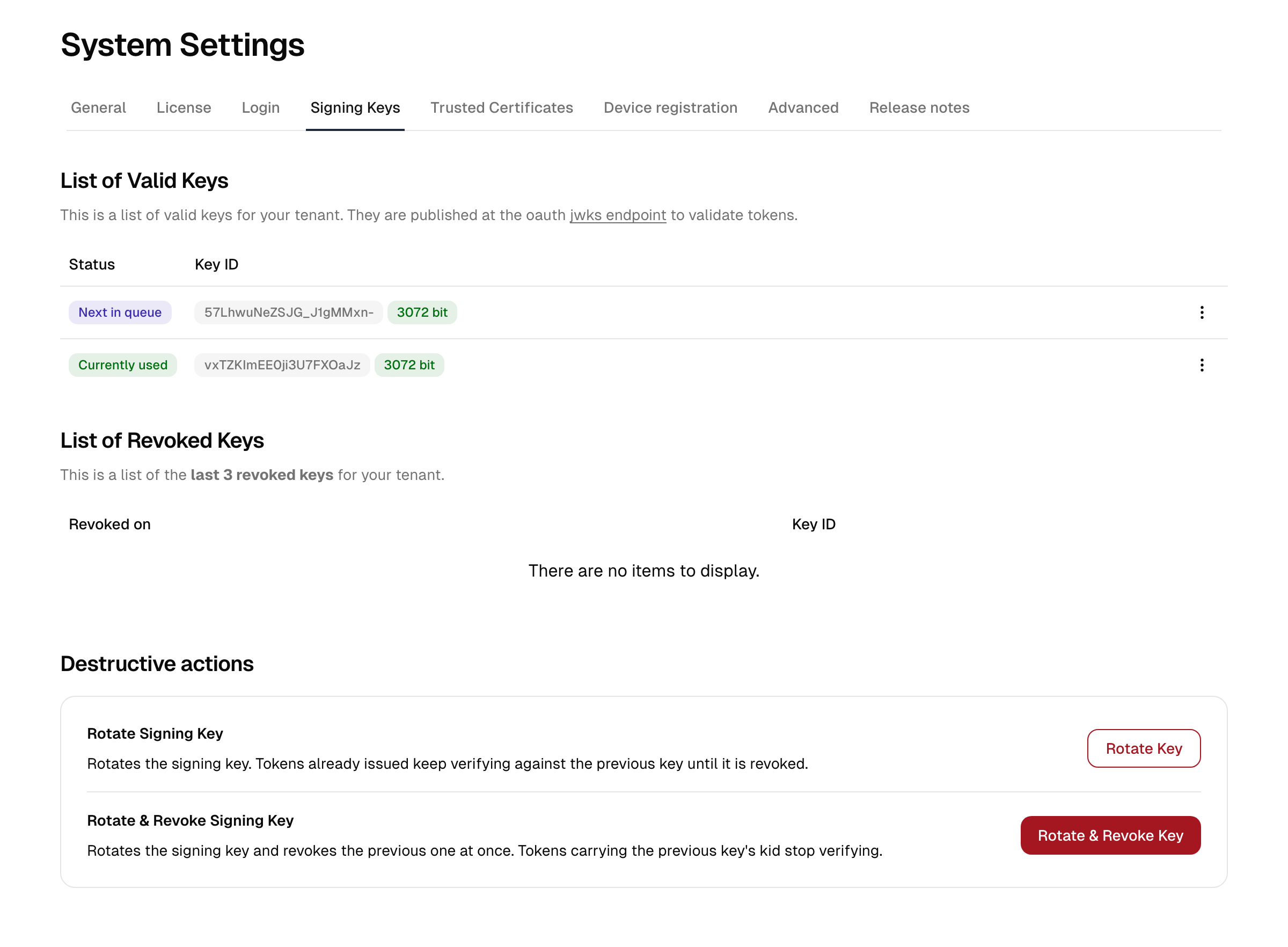
The Signing keys tab shows these three keys with their status:
| Status | Role |
|---|---|
| Next | Published ahead of time so applications already know it when it starts signing. |
| Current | Signs every token issued now. |
| Previous | Signed until the last rotation. Still in the key set, so tokens carrying its kid keep verifying until you revoke it. |
Each key is identified by a Key ID (kid), which applications use to pick the right public key when verifying a token. A badge next to the Key ID shows the key size in bits. Newly generated keys are RSA 3072-bit; older 2048-bit keys remain valid for verification and are replaced with the stronger size as you rotate.
Viewing and exporting a key
For any key in the list, open the actions menu to:
- Copy the signing certificate to the clipboard.
- View the certificate details.
- Download the certificate as a
.pemfile.
This is useful when an application needs the certificate configured manually rather than fetched from the JWKS endpoint.
Why rotation matters
Rotating signing keys regularly limits the damage if a key is ever compromised and is a common compliance requirement. How much work a rotation causes depends on how each application learned the key:
- A SAML or WS-Federation service provider that trusts one pinned certificate must be given the next key's certificate before you rotate, otherwise its signature verification fails after the change.
- An OIDC application with a manually configured key needs the same preparation.
- An application that fetches the key set from the JWKS endpoint picks the new key up on its own, because the endpoint publishes the next, current, and previous public keys. For these applications rotation happens without downtime.
Note: Rotation affects OIDC and OAuth applications. After a rotation it can take up to roughly 30 seconds before the change takes full effect.
Rotating and revoking
The actions are under Destructive actions at the bottom of the page. Each asks you to confirm.
| Action | What happens | Effect on existing tokens |
|---|---|---|
| Rotate key | The next key becomes current; the old current key becomes previous. If a previous key already existed, it is revoked and moves to the revocation list. | Verification of already-issued tokens continues; the previous key stays in the key set. |
| Rotate & revoke key | Rotates as above and immediately revokes the previous key. | Tokens carrying the previous key's kid stop verifying. |
| Revoke key | Revokes the previous key without rotating. | Tokens carrying that key's kid stop verifying. |
The three most recent revocations stay listed with their date, for audit purposes.
Recommended sequence
- Ensure every application that pins a certificate manually trusts the next key.
- Use Rotate key. New tokens are now signed with the new key; older tokens stay valid.
- Once you are confident no application still relies on the previous key, revoke it.
Use Rotate & revoke key only when you need to invalidate previously issued tokens immediately — for example after a suspected key compromise.
Caution: Revoking a key that applications still rely on will break their token verification. Rotate first, confirm applications have moved over, and revoke only afterward.
Central keys vs. a per-application signing certificate
There are two places signing keys appear, and they are not the same thing:
- The central signing keys on this page sign every OIDC ID token and access token the platform issues, and the SAML/WS-Federation assertions it produces by default. Rotating here affects all applications that trust the platform's published keys.
- A per-application signing certificate can be configured on an individual SAML or WS-Federation application instead, when that service provider expects to trust one specific certificate rather than the platform's central key.
If a service provider reports a signature failure, first confirm which key it is configured to trust — the central key published at the JWKS endpoint, or a certificate pinned on that one application. See Integrations → Applications for where an application's credential is set.