

Rate limits & blocked IPs
View IP addresses currently throttled or blocked by threat protection, and release a block when needed.
A blocked IP address is one that the platform's threat-protection controls have throttled or shut out after too many failed attempts. The Blocked IPs view lists them live, and is most useful when a legitimate user has been locked out and you need to release their block.
You find it under Audit Trail → Rate Limits in the Admin Console.
Note: Viewing the list and releasing a block require sufficient admin permissions. An administrator whose access is scoped to a limited set of resources may not see this view at all.
How throttling and blocking work
The platform protects the login and signup surface against abuse by counting failed attempts and holding back the source once a threshold is crossed. Two kinds of limit drive the entries you see here:
- Brute-force protection — counts consecutive failed login attempts and blocks once the configured number is exceeded.
- Per-IP rate limiting — caps how many login attempts an IP may make per day and how many signup attempts it may make per minute.
These thresholds are configured under Security → Threat protection. Addresses inside a trusted network zone can be exempted from throttling, so a known office range is not held back by ordinary login churn.
What trips each block, and what the client sees
| Limit | What trips it | What the throttled client experiences |
|---|---|---|
| Consecutive login failures | One account hit with repeated wrong passwords in a row — the classic single-account brute-force. | That account is locked out; further sign-in attempts are refused until the block clears or you release it. |
| Login attempts per IP per day | One source IP making a high volume of login attempts across many accounts in a day — credential-stuffing or scripted spray. | The IP is held back; its login attempts are refused for the rest of the daily window. |
| Signup attempts per IP per minute | One source IP firing many self-service sign-ups in a short burst — typically automated account creation. | The IP's sign-up attempts are refused until the per-minute window resets. |
The first is scoped to an account; the other two are scoped to a source IP. That distinction matters when you decide where to remediate: a single locked-out person is usually an account lockout, while a noisy IP affecting several accounts is throttling.
Is it a real attacker or a false positive?
Before you release a block, check the context:
- Look at the Target and Attempts. A single account climbing steadily against the threshold is often a forgetful user or a stale saved password. One IP racing through many accounts is far more likely to be an attack.
- Cross-check the audit log. Brute-force detection and rate-limit breaches are recorded there. Filter by the IP and time window to see whether the attempts target one account or spray many, and whether any succeeded.
- Check the network zone. Traffic from a shared corporate egress IP can trip per-IP rate limiting legitimately — consider adding that range to a trusted zone rather than repeatedly clearing it.
If it looks like a genuine attack, leave the block in place; it will continue to protect the surface. Only release a block you can attribute to a legitimate user.
Reading the list
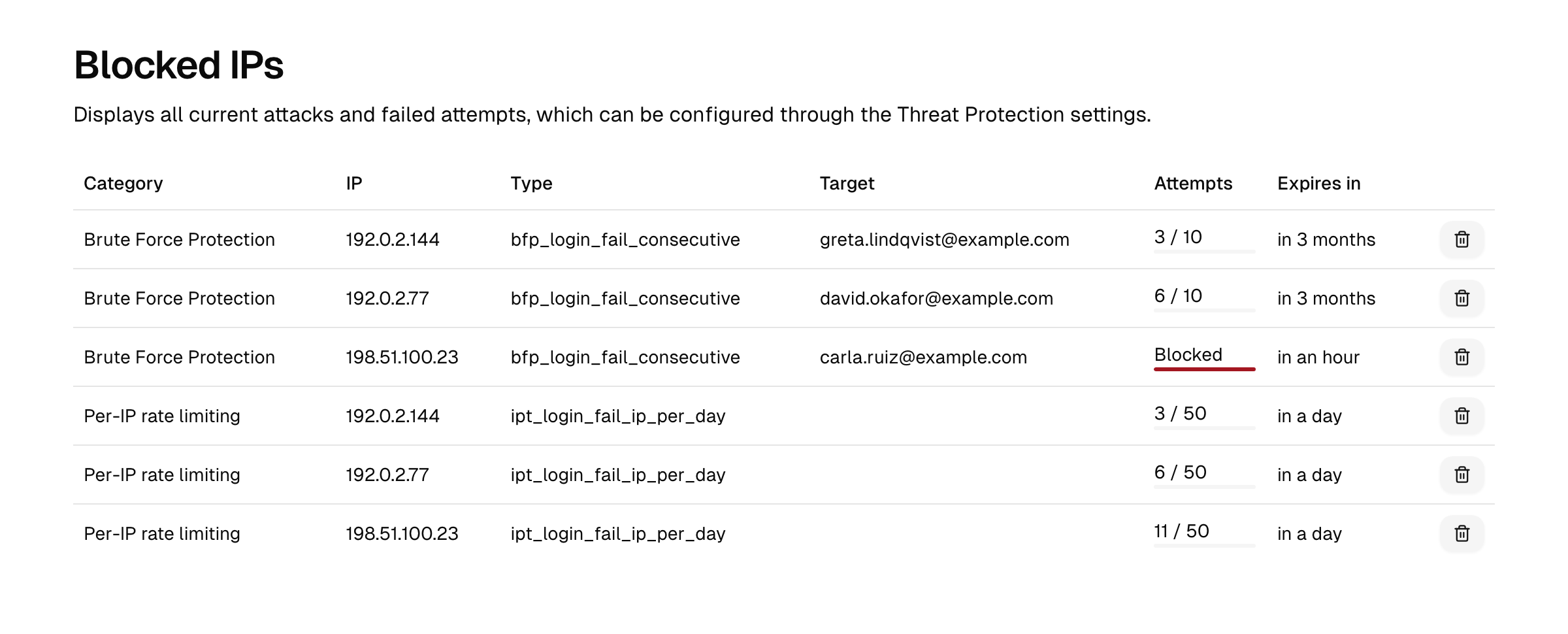
Each row shows:
| Column | Meaning |
|---|---|
| Category | The protection that created the entry. |
| IP | The source IP address being counted. IPv6 addresses are counted by their /64 prefix and shown as such (for example 2001:0db8:0001:0002::/64). |
| Type | The specific limit (consecutive login failures, login attempts per day, signup attempts per minute). |
| Target | What the count applies to, where relevant. |
| Attempts | The current count against its threshold, with a progress bar. A row that has crossed its threshold is marked Blocked. |
| Expires in | When the count resets and the address is no longer held back. |
Blocks are temporary: each entry expires on its own once its window passes, and the address is then free again without any action on your part.
Releasing a block
If a legitimate user is locked out and you do not want to wait for the block to expire:
- Open Audit Trail → Rate Limits.
- Find the row for the affected IP address.
- Use the row's delete action to unblock it. The counter is cleared immediately and the address can attempt again.
Note: Unblocking only clears the current count. If the underlying behaviour continues — for example a real brute-force attempt — the address will be throttled again. Investigate before clearing a block you did not expect.
Related
- Threat protection — where brute-force and throttling thresholds are configured.
- Network zones — define trusted ranges that bypass throttling.
- Audit logs — brute-force detection and rate-limit breaches are also recorded as audit events.